
Notice
Recent Posts
Recent Comments
Link
| 일 | 월 | 화 | 수 | 목 | 금 | 토 |
|---|---|---|---|---|---|---|
| 1 | 2 | 3 | 4 | 5 | 6 | |
| 7 | 8 | 9 | 10 | 11 | 12 | 13 |
| 14 | 15 | 16 | 17 | 18 | 19 | 20 |
| 21 | 22 | 23 | 24 | 25 | 26 | 27 |
| 28 | 29 | 30 | 31 |
Tags
- OAuth 2.0
- spring security
- lombok
- java
- synchronized
- builder
- 일급 객체
- Dependency Injection
- Volatile
- Google OAuth
- factory
- Spring
- 일급 컬렉션
Archives
- Today
- Total
HJW's IT Blog
[CodeIt] 6월 4주차_01 본문
비동기 JS
- 코드를 request 를 보내고 response를 기다리는 시간동안 그저 기다리기만 하는 것은 효율 x
- 그렇기에 오래 기다려야 하는 작업이 있다면, 다른 작업을 우선하고 해당 작업이 완료되면 돌아가는 것
- JS 는 다양한 비동기 문법과 툴이 있다.
- Callback & Promise
💡 복습 : Parameter ( 함수에 전달받은 값을 함수 내부로 전달하기 위해 사용하는 변수) , Argument ( 함수에 실제
Callback
fuction sayHello(){
	console.log("Hello");
}

fuction pringMessage(func){
	console.log("printing..");
	func();
}

printMessage(sayHello);
- Argument로 sayHello 함수를 전달한다
- 다른함수의 argument 로 전달되는 함수를 callback 이라 부른다
- 간단한 callback 함수는 arrow function 을 사용할 수 있다
printMessage(() => console.log('Hello World'));
fuction sayHello(name){
	console.log("Hello ${name}");
}

fuction pringMessage(func, name){
	console.log("printing..");
	func(name);
}

printMessage(sayHello, 'Bob');
printMessage((name)=> console.log('hello ${name}'), 'bob');
- 위와 같이 callback 함수는 파라미터를 받을 수 도 있다
비동기 & 콜백
- setTimeout(()⇒ console.log(’Hello’), 3000);
- 3000 밀리초 후 출력하는 동작을 한다
console.log('1');

setTimeout(()=>console.log('2'), 3000);

console.log('3');
- 위 코드의 결과는 다음과 같다 1, 3, 2
- 아래는 코드의 실행 순서이다.

- 만약 setTimeout() 이 동기 실행이었다면, 1,2,3 순서로 출력되었을 것이다.
- 실제로 동기 실행의 경우 비동기 실행에 비해 더 오래 걸리는 것을 볼 수 있다.
<aside> 💡 비동기 함수 (Asynchronous Function) ⇒ 함수의 내용을 끝까지 쭉 실행하지 않고 중간에 다른 작업을 처리하다가 다시 돌아와서 마무리를 하는 함수
</aside>
<aside> 💡 setTimeout() 함수는 2개 이상의 argument 를 받을 수 있는데, delay 를 제외한 나머지 argument 는 callback 함수의 argument 로 전달된다.
</aside>
- 비동기 함수의 콜백은 비동기 함수 뒤에 있는 코드가 모두 실행된 후에 실행된다.
setInterval(() => console.log('2초'), 2000);
- setInterval 함수는 시간 간격을 두고 콜백을 반복적으로 실행한다
- 호출을 멈추고 싶다면, 함수의 리턴값을 저장해 두었다가 clearInterval() 을 사용
const btn = document.querySelector('.my-btn');

btn.addEventListener('click', () => console.log('button clicked!'));
- 클릭 이벤트 발생시 button clocked! 라는 문구가 출력되는 콜백 함수이다.
- 웹페이지 요소에 상호작용이 있을 경우 실행할 함수를 등록한다.
Callback Hell
getEmployees((response) => {
	json(response, (data) => {
		console.log(data);
	});
});
- getEmployees 의 response 가 오면, 해당 response 를 json 함수로 넘기고, json 에서 response를 배열로 다 바꾸면 출력하라는 뜻
- 콜백안에 여러번 콜백이 중첩되는 경우 callback hell 이라 한다
- 가독성이 떨어지고, 테스트 하기도 힘들기 때문이다.
- 해당 문제를 해결하기 위해 Promise 를 사용한다.
Promise
const response=fetch('url');
console.log(response);
- 위 코드의 결과는 Promise {<pending>}
- Promise란?
- 비동기 작업이 완료되면 값을 알려주는 객체
- 작업이 완료되면 값을 알려줄 것을 약속함
- 일단 Promise 를 돌려주고 작업 완료시, 결과값을 Promise 에 넣어준다.
//위 callback hell 의 코드를 promise 기반으로 변경시

const response = await fetch ('...');
const data = await response.json();
console.log(data);
- 익숙하며 가독성이 좋다
Await 문법
- fetch 함수는 Promise 객체를 반환한다
- 결과값을 받아오기 위해 await 을 사용한다
const response= await fetch('url');
console.log(response);
- fetch 작업이 완료될 때 까지 기다린다.
- Promise 는 3가지 상태를 가진다
- Pending → response의 결과를 기다리는 상태
- Fulfilled → 비동기 작업의 성공 결과
- await은 fullfilled 상태가 될때까지 기다린다
Async 함수
const response = await fetch ('...');
const data = await response.json();
console.log(data);
console.log('2');
console.log('3');
- 위의 경우 json 의 parsing 이 끝난 후 2 와 3이 출력된다.
- 비동기 함수의 취지와 맞지 않는다
export function printEmployees(){
	const response = await fetch ('...');
	const data = await response.json();
	console.log(data);
}


export async function printEmployees(){
	const response = await fetch ('...');
	const data = await response.json();
	console.log(data);
}
- 위 코드의 첫번째 함수는 async function 내부에서만 await 을 사용할 수 있다는 에러가 뜬다
- 그렇기에 두번째 함수처럼 async 키워드가 필수적이다
- 위 코드를 가지고 다시 실행하면 다음과 같다
- 결과는 2, 3 후 parsing 된 결과가 출력
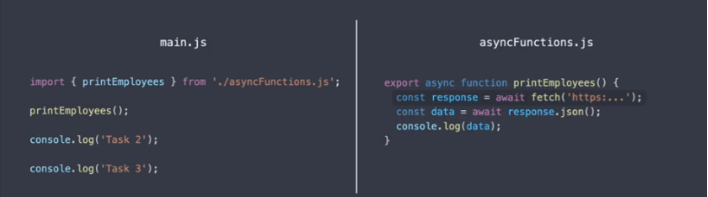
- async 함수 내부에서 await 을 쓰면, promise 가 fullfilled 가 되기 기다리는 동안, 다시 함수 바깥의 코드를 모두 실행한다.
- fulfilled 상태가 되면, 다시 함수의 body 로 돌아와 나머지 함수를 실행
효율적인 비동기코드
- await 이 많은 코드는 오래 걸린다.
async function printEmployees(){
	for (let i = 1; i<11; i++){
		const response = await fetch('url');
		const data = await response.json();
		console.log(data);
	}
}

printEmployees();
async function printEmployees(id){

	const response = await fetch('url${id}');
	const data = await response.json();
	console.log(data);

}
for(let i = 1; i<11; i++){
	printEmployees(i);
}
- async 함수는 항상 promise 를 return 한다.
- 그렇기 때문에 const emp = await getEmployees(); 처럼 await 을 선언해 주어야 한다.
Promise 와 오류
- Pormise 객체에 오류가 행기면 rejected 상태가 된다
- try 문 내에서 오류가 throw 되기에, catch 문이 실행된다
- async function → 이후 코드 실행 → async function 복귀 후 promise 객체 확인 → fulfilled 상태이면 계속 진행, rejected 라면 throw error
then 메서드
const dataPromise = fetch('url')
										.then((response) => response.json());
dataPromise.then((data) => console.log(data));
const dataPromise = fetch('url')
										.then((response) => response.json());
										.then((data) => console.log(data));
- Promise chain 이라 한다
- 위 예제의 경우, promise 객체가 3개 생성
- 기다리다 response 가 돌아오면 순차적으로 then 메소드에 등록된 callback 이 실행된다.
- promise chain 을 사용할때는, catch 와 finally 메서드를 사용할 수 있다
const dataPromise = fetch('url')
										.then((response) => response.json());
										.then((data) => console.log(data));
										.catch((error) => console.log('ERROR');
										.finally(...);
Promise.all() 메소드
async function getEmployees(id){

	const response = await fetch('url${id}');
	const data = await response.json();
	return data;

}

const promises = [];

for(let i = 1; i<11; i++){
	promises.push(getEmployees(i));
}

Promise.all(promises);
const employees = await Promise.all(promises);
console.log(employees);
- 위의 방식은 await 을 하지 않기에 거의 병렬적으로 실행하게 된다.
- 그림으로 위 코드를 표현하면
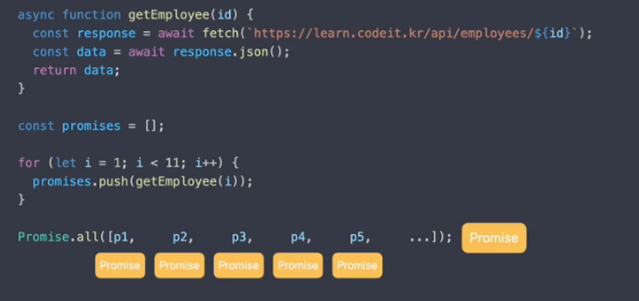
- 내부의 promise 들이 fulfill 상태가 되면, 전체 promise가 fulfill 상태가 된다
- 하나라도 reject라면, 전체또한 rejected 이다
- 코드를 request 를 보내고 response를 기다리는 시간동안 그저 기다리기만 하는 것은 효율 x
- 그렇기에 오래 기다려야 하는 작업이 있다면, 다른 작업을 우선하고 해당 작업이 완료되면 돌아가는 것
- JS 는 다양한 비동기 문법과 툴이 있다.
- Callback & Promise
- Argument로 sayHello 함수를 전달한다
- 다른함수의 argument 로 전달되는 함수를 callback 이라 부른다
- 간단한 callback 함수는 arrow function 을 사용할 수 있다
printMessage(() => console.log('Hello World'));fuction sayHello(name){ console.log("Hello ${name}"); } fuction pringMessage(func, name){ console.log("printing.."); func(name); } printMessage(sayHello, 'Bob'); printMessage((name)=> console.log('hello ${name}'), 'bob');- 위와 같이 callback 함수는 파라미터를 받을 수 도 있다
- setTimeout(()⇒ console.log(’Hello’), 3000);
- 3000 밀리초 후 출력하는 동작을 한다
console.log('1'); setTimeout(()=>console.log('2'), 3000); console.log('3');- 위 코드의 결과는 다음과 같다 1, 3, 2
- 아래는 코드의 실행 순서이다.

- 만약 setTimeout() 이 동기 실행이었다면, 1,2,3 순서로 출력되었을 것이다.
- 실제로 동기 실행의 경우 비동기 실행에 비해 더 오래 걸리는 것을 볼 수 있다.
- 비동기 함수의 콜백은 비동기 함수 뒤에 있는 코드가 모두 실행된 후에 실행된다.
setInterval(() => console.log('2초'), 2000);- setInterval 함수는 시간 간격을 두고 콜백을 반복적으로 실행한다
- 호출을 멈추고 싶다면, 함수의 리턴값을 저장해 두었다가 clearInterval() 을 사용
const btn = document.querySelector('.my-btn'); btn.addEventListener('click', () => console.log('button clicked!'));- 클릭 이벤트 발생시 button clocked! 라는 문구가 출력되는 콜백 함수이다.
- 웹페이지 요소에 상호작용이 있을 경우 실행할 함수를 등록한다.
- getEmployees 의 response 가 오면, 해당 response 를 json 함수로 넘기고, json 에서 response를 배열로 다 바꾸면 출력하라는 뜻
- 콜백안에 여러번 콜백이 중첩되는 경우 callback hell 이라 한다
- 가독성이 떨어지고, 테스트 하기도 힘들기 때문이다.
- 해당 문제를 해결하기 위해 Promise 를 사용한다.
- 위 코드의 결과는 Promise {<pending>}
- Promise란?
- 비동기 작업이 완료되면 값을 알려주는 객체
- 작업이 완료되면 값을 알려줄 것을 약속함
- 일단 Promise 를 돌려주고 작업 완료시, 결과값을 Promise 에 넣어준다.
//위 callback hell 의 코드를 promise 기반으로 변경시 const response = await fetch ('...'); const data = await response.json(); console.log(data);- 익숙하며 가독성이 좋다
- fetch 함수는 Promise 객체를 반환한다
- 결과값을 받아오기 위해 await 을 사용한다
const response= await fetch('url'); console.log(response);- fetch 작업이 완료될 때 까지 기다린다.
- Promise 는 3가지 상태를 가진다
- Pending → response의 결과를 기다리는 상태
- Fulfilled → 비동기 작업의 성공 결과
- await은 fullfilled 상태가 될때까지 기다린다
- 위의 경우 json 의 parsing 이 끝난 후 2 와 3이 출력된다.
- 비동기 함수의 취지와 맞지 않는다
export function printEmployees(){ const response = await fetch ('...'); const data = await response.json(); console.log(data); } export async function printEmployees(){ const response = await fetch ('...'); const data = await response.json(); console.log(data); }- 위 코드의 첫번째 함수는 async function 내부에서만 await 을 사용할 수 있다는 에러가 뜬다
- 그렇기에 두번째 함수처럼 async 키워드가 필수적이다
- 위 코드를 가지고 다시 실행하면 다음과 같다
- 결과는 2, 3 후 parsing 된 결과가 출력

- async 함수 내부에서 await 을 쓰면, promise 가 fullfilled 가 되기 기다리는 동안, 다시 함수 바깥의 코드를 모두 실행한다.
- fulfilled 상태가 되면, 다시 함수의 body 로 돌아와 나머지 함수를 실행
- await 이 많은 코드는 오래 걸린다.
async function printEmployees(){
	for (let i = 1; i<11; i++){
		const response = await fetch('url');
		const data = await response.json();
		console.log(data);
	}
}

printEmployees();
async function printEmployees(id){ const response = await fetch('url${id}'); const data = await response.json(); console.log(data); } for(let i = 1; i<11; i++){ printEmployees(i); }- async 함수는 항상 promise 를 return 한다.
- 그렇기 때문에 const emp = await getEmployees(); 처럼 await 을 선언해 주어야 한다.
- Pormise 객체에 오류가 행기면 rejected 상태가 된다
- try 문 내에서 오류가 throw 되기에, catch 문이 실행된다
- async function → 이후 코드 실행 → async function 복귀 후 promise 객체 확인 → fulfilled 상태이면 계속 진행, rejected 라면 throw error
const dataPromise = fetch('url') .then((response) => response.json()); .then((data) => console.log(data));- Promise chain 이라 한다
- 위 예제의 경우, promise 객체가 3개 생성
- 기다리다 response 가 돌아오면 순차적으로 then 메소드에 등록된 callback 이 실행된다.
- promise chain 을 사용할때는, catch 와 finally 메서드를 사용할 수 있다
Promise.all() 메소드const dataPromise = fetch('url') .then((response) => response.json()); .then((data) => console.log(data)); .catch((error) => console.log('ERROR'); .finally(...);- 위의 방식은 await 을 하지 않기에 거의 병렬적으로 실행하게 된다.
- 그림으로 위 코드를 표현하면

- 내부의 promise 들이 fulfill 상태가 되면, 전체 promise가 fulfill 상태가 된다
- 하나라도 reject라면, 전체또한 rejected 이다
- 코드를 request 를 보내고 response를 기다리는 시간동안 그저 기다리기만 하는 것은 효율 x
- 그렇기에 오래 기다려야 하는 작업이 있다면, 다른 작업을 우선하고 해당 작업이 완료되면 돌아가는 것
- JS 는 다양한 비동기 문법과 툴이 있다.
- Callback & Promise
- Argument로 sayHello 함수를 전달한다
- 다른함수의 argument 로 전달되는 함수를 callback 이라 부른다
- 간단한 callback 함수는 arrow function 을 사용할 수 있다
printMessage(() => console.log('Hello World'));fuction sayHello(name){ console.log("Hello ${name}"); } fuction pringMessage(func, name){ console.log("printing.."); func(name); } printMessage(sayHello, 'Bob'); printMessage((name)=> console.log('hello ${name}'), 'bob');- 위와 같이 callback 함수는 파라미터를 받을 수 도 있다
- setTimeout(()⇒ console.log(’Hello’), 3000);
- 3000 밀리초 후 출력하는 동작을 한다
console.log('1'); setTimeout(()=>console.log('2'), 3000); console.log('3');- 위 코드의 결과는 다음과 같다 1, 3, 2
- 아래는 코드의 실행 순서이다.
- 만약 setTimeout() 이 동기 실행이었다면, 1,2,3 순서로 출력되었을 것이다.
- 실제로 동기 실행의 경우 비동기 실행에 비해 더 오래 걸리는 것을 볼 수 있다.
- 비동기 함수의 콜백은 비동기 함수 뒤에 있는 코드가 모두 실행된 후에 실행된다.
setInterval(() => console.log('2초'), 2000);- setInterval 함수는 시간 간격을 두고 콜백을 반복적으로 실행한다
- 호출을 멈추고 싶다면, 함수의 리턴값을 저장해 두었다가 clearInterval() 을 사용
const btn = document.querySelector('.my-btn'); btn.addEventListener('click', () => console.log('button clicked!'));- 클릭 이벤트 발생시 button clocked! 라는 문구가 출력되는 콜백 함수이다.
- 웹페이지 요소에 상호작용이 있을 경우 실행할 함수를 등록한다.
- getEmployees 의 response 가 오면, 해당 response 를 json 함수로 넘기고, json 에서 response를 배열로 다 바꾸면 출력하라는 뜻
- 콜백안에 여러번 콜백이 중첩되는 경우 callback hell 이라 한다
- 가독성이 떨어지고, 테스트 하기도 힘들기 때문이다.
- 해당 문제를 해결하기 위해 Promise 를 사용한다.
- 위 코드의 결과는 Promise {<pending>}
- Promise란?
- 비동기 작업이 완료되면 값을 알려주는 객체
- 작업이 완료되면 값을 알려줄 것을 약속함
- 일단 Promise 를 돌려주고 작업 완료시, 결과값을 Promise 에 넣어준다.
//위 callback hell 의 코드를 promise 기반으로 변경시 const response = await fetch ('...'); const data = await response.json(); console.log(data);- 익숙하며 가독성이 좋다
- fetch 함수는 Promise 객체를 반환한다
- 결과값을 받아오기 위해 await 을 사용한다
const response= await fetch('url'); console.log(response);- fetch 작업이 완료될 때 까지 기다린다.
- Promise 는 3가지 상태를 가진다
- Pending → response의 결과를 기다리는 상태
- Fulfilled → 비동기 작업의 성공 결과
- await은 fullfilled 상태가 될때까지 기다린다
- 위의 경우 json 의 parsing 이 끝난 후 2 와 3이 출력된다.
- 비동기 함수의 취지와 맞지 않는다
export function printEmployees(){ const response = await fetch ('...'); const data = await response.json(); console.log(data); } export async function printEmployees(){ const response = await fetch ('...'); const data = await response.json(); console.log(data); }- 위 코드의 첫번째 함수는 async function 내부에서만 await 을 사용할 수 있다는 에러가 뜬다
- 그렇기에 두번째 함수처럼 async 키워드가 필수적이다
- 위 코드를 가지고 다시 실행하면 다음과 같다
- 결과는 2, 3 후 parsing 된 결과가 출력
- async 함수 내부에서 await 을 쓰면, promise 가 fullfilled 가 되기 기다리는 동안, 다시 함수 바깥의 코드를 모두 실행한다.
- fulfilled 상태가 되면, 다시 함수의 body 로 돌아와 나머지 함수를 실행
- await 이 많은 코드는 오래 걸린다.
async function printEmployees(){
	for (let i = 1; i<11; i++){
		const response = await fetch('url');
		const data = await response.json();
		console.log(data);
	}
}

printEmployees();
async function printEmployees(id){ const response = await fetch('url${id}'); const data = await response.json(); console.log(data); } for(let i = 1; i<11; i++){ printEmployees(i); }- async 함수는 항상 promise 를 return 한다.
- 그렇기 때문에 const emp = await getEmployees(); 처럼 await 을 선언해 주어야 한다.
- Pormise 객체에 오류가 행기면 rejected 상태가 된다
- try 문 내에서 오류가 throw 되기에, catch 문이 실행된다
- async function → 이후 코드 실행 → async function 복귀 후 promise 객체 확인 → fulfilled 상태이면 계속 진행, rejected 라면 throw error
const dataPromise = fetch('url') .then((response) => response.json()); .then((data) => console.log(data));- Promise chain 이라 한다
- 위 예제의 경우, promise 객체가 3개 생성
- 기다리다 response 가 돌아오면 순차적으로 then 메소드에 등록된 callback 이 실행된다.
- promise chain 을 사용할때는, catch 와 finally 메서드를 사용할 수 있다
Promise.all() 메소드const dataPromise = fetch('url') .then((response) => response.json()); .then((data) => console.log(data)); .catch((error) => console.log('ERROR'); .finally(...);- 위의 방식은 await 을 하지 않기에 거의 병렬적으로 실행하게 된다.
- 그림으로 위 코드를 표현하면

- 내부의 promise 들이 fulfill 상태가 되면, 전체 promise가 fulfill 상태가 된다
- 하나라도 reject라면, 전체또한 rejected 이다