Notice
Recent Posts
Recent Comments
Link
| 일 | 월 | 화 | 수 | 목 | 금 | 토 |
|---|---|---|---|---|---|---|
| 1 | 2 | 3 | 4 | 5 | 6 | |
| 7 | 8 | 9 | 10 | 11 | 12 | 13 |
| 14 | 15 | 16 | 17 | 18 | 19 | 20 |
| 21 | 22 | 23 | 24 | 25 | 26 | 27 |
| 28 | 29 | 30 | 31 |
Tags
- builder
- factory
- 일급 객체
- Volatile
- OAuth 2.0
- 일급 컬렉션
- Dependency Injection
- synchronized
- lombok
- spring security
- Spring
- java
- Google OAuth
Archives
- Today
- Total
HJW's IT Blog
조각집 프로젝트 기록 - 02 본문
TypeScript를 사용하는 만큼 그 이점인 객체 지향적 설계에 신경을 써서 프로젝트 구조를 설계 하였다.
한가지 기능을 3파트로 나누어 작성하였다. DTO, router, controller.
DTO : Data Transfer Object
- 어플리케이션 계층간 데이터를 전송하는데 사용되는 객체이다.
- 타입 안정성을 컴파일 타임에 검증할 수 있다
- 유효성을 검증하여 잘못된 데이터의 전달을 막을 수 있다.
Router
- 들어오는 요청을 적절한 controller 로 매핑하고, 라우팅 로직을 관리한다
- API 경로가 라우터를 통해 모듈화 되어 있기 때문에, 새로운 API 를 추가하거나 기존 API에 대한 수정을 할 떄, 다른 부분과 독립적으로 수정이 가능하다
Controller
- 컨트롤러는 애플리케이션의 비즈니스 로직을 담당하며, 모델과 뷰 사이의 상호작용을 조정한다
//createGroupDTO.ts
export class CreateGroupDto {
  GName: string;
  GImage?: string;
  GIntro?: string;
  IsPublic: boolean;
  GPassword: string;

  constructor(gName: string, isPublic: boolean, gPassword: string, gImage?: string, gIntro?: string) {
    this.GName = gName;
    this.IsPublic = isPublic;
    this.GPassword = gPassword;
    this.GImage = gImage;
    this.GIntro = gIntro;
  }
}
createGroupDTO를 생성해 주었다. 해당 코드에서는 생성자를 사용하여 클래스의 인스턴스를 초기화 해주었는데, 이는 명확한 데이터의 초기화, 강제된 필수 속성, 타입 안정성의 강화 등이 있다.
// groupRoutes.ts
import express from 'express';
import {createGroup} from '../controllers/groupController';

const router = express.Router();

router.post('/groups', async(req,res) =>{
  try{
    const newGroup = await createGroup(req.body);
    res.status(201).json(newGroup);
  }catch(error){
    res.status(400).json({message : 'Error Creating Group'});
  }
});

export default router;
기본적인 post 요청에 대한 처리를 담당하는 라우트를 생성하였다.
//groupController. ts
import { PrismaClient } from "@prisma/client";
import { CreateGroupDto } from "../DTO/createGroupDTO";

const prisma = new  PrismaClient();

export async function createGroup(groupData : CreateGroupDto){
  try
  {
    const newGroup = await prisma.group.create({
      data: {
        GName: groupData.GName,
        GImage: groupData.GImage,
        GIntro: groupData.GIntro,
        IsPublic: groupData.IsPublic,
        GPassword: groupData.GPassword,
        GLikes: 0,
        GBadgeCount: 0,
        PostCount:0,
      }
    });
    return newGroup;
  } catch (error){
    console.log("ERROR");
  }
}
해당 코드는 newGroup 객체를 반환중인데, 이는 개발단계에서 데이터가 성공적으로 삽입 및 반환되는지를 확인하기 위함이다.
API를 작성하였으니 테스트를 해 볼 단계이다. 테스트는 REST Client 를 통해 진행되었다.
POST
Content-Type: application/json

{
  "GName": "New Group",
  "GImage": "<http://example.com/image.jpg>",
  "GIntro": "This is a test group.",
  "IsPublic": true,
  "GPassword": "securepassword"
}
위와 같이 임시 데이터를 작성후, 테스트를 하였다.
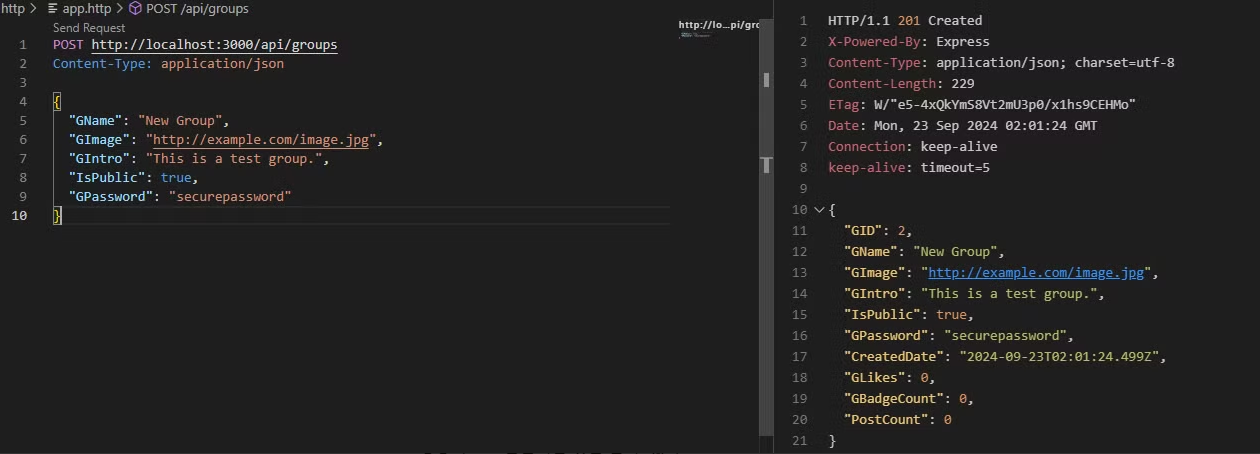
정상적으로 반환되는 것을 볼 수 있다.
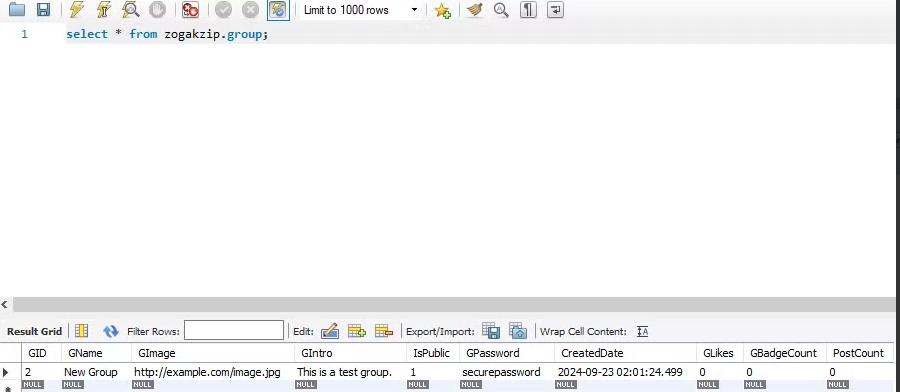
MySQL 에서도 확인해 보겠다.